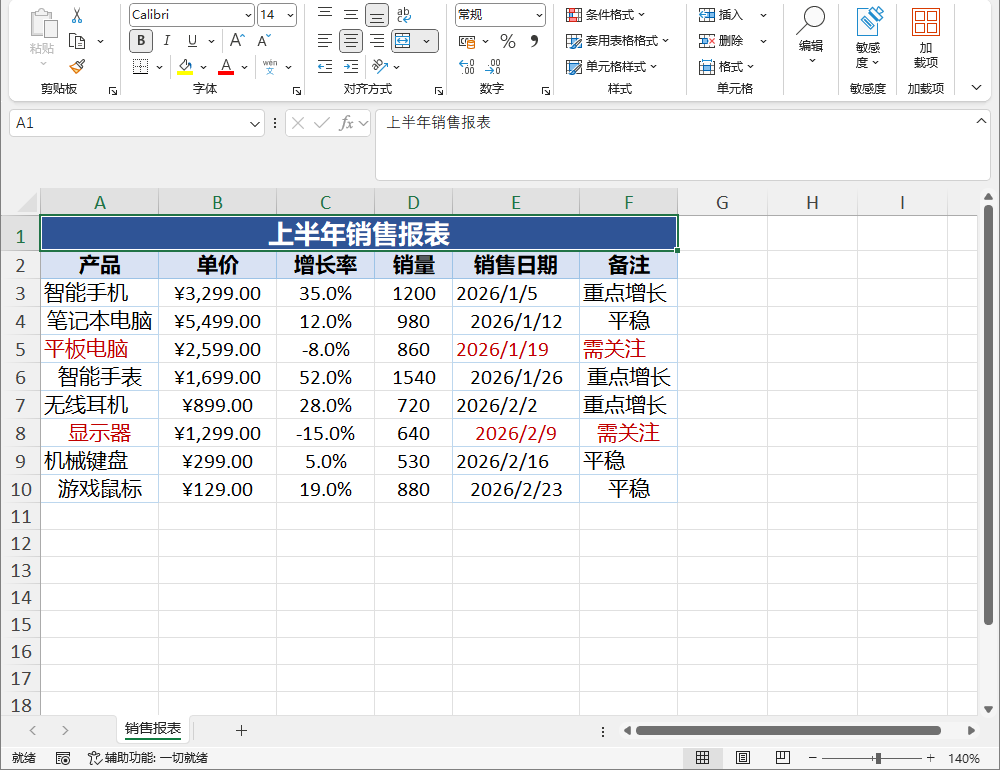
6. 样式
本章讲样式:单元格与区域样式、边框、对齐与换行、表头 / 默认 / 行 / 列级样式及优先级。
6.1 单元格样式 CellStyle
颜色统一使用 "#RRGGBB" 格式:
var style = new CellStyle
{
    FontName = "Arial",
    FontSize = 12,
    Bold = true,
    Italic = true,
    Underline = false,
    Strikeout = false,
    FontColor = "#FF0000",
    FillColor = "#FFFF00",
    HorizontalAlignment = HorizontalAlignment.Center,
    VerticalAlignment = VerticalAlignment.Center,
    WrapText = true,
    NumberFormat = "#,##0.00",   // 用于 dxf 读回(超级表列格式 / 条件格式)
    Border = new BorderStyle
    {
        Top = new BorderEdge { Style = "thin", Color = "#000000" },
    },
};
| 成员 | 类型 | 说明 |
|---|---|---|
FontName |
string? |
字体名,如 "Arial" |
FontSize |
double |
字号,默认 11 |
Bold |
bool |
加粗 |
Italic |
bool |
斜体 |
Underline |
bool |
下划线 |
Strikeout |
bool |
删除线 |
FontColor |
string? |
字体颜色,"#RRGGBB" 格式 |
FillColor |
string? |
填充颜色,"#RRGGBB" 格式 |
HorizontalAlignment |
HorizontalAlignment |
水平对齐,默认 General |
VerticalAlignment |
VerticalAlignment |
垂直对齐,默认 Bottom |
WrapText |
bool |
自动换行 |
NumberFormat |
string? |
数字格式代码(用于 dxf 读回) |
Border |
BorderStyle? |
边框 |
var ws = Excel.Create().Worksheets["Sheet1"];

ws.Cell("A1").Style = style;
Console.WriteLine(ws.Cell("A1").Style.Bold);   // True
输出:
6.2 边框 BorderStyle / BorderEdge
var style = new CellStyle
{
    Border = new BorderStyle
    {
        Top = new BorderEdge { Style = "thin", Color = "#000000" },
        Bottom = new BorderEdge { Style = "double" },
        Left = new BorderEdge { Style = "medium", Color = "#333333" },
        Right = new BorderEdge { Style = "dashed" },
    },
};
BorderEdge.Style 为字符串,常用值:thin / medium / thick / double / dashed / dotted 等。
var ws = Excel.Create().Worksheets["Sheet1"];

ws.Cell("A1").Style = style;
Console.WriteLine(ws.Cell("A1").Style.Border.Top.Style);   // thin
输出:
6.3 对齐与换行
public enum HorizontalAlignment { General, Left, Center, Right }
public enum VerticalAlignment { Top, Center, Bottom }
WrapText = true 启用单元格内自动换行。
6.4 设置单元格 / 区域样式(对象模型 API)
var ws = Excel.Create().Worksheets["Sheet1"];

// 单格
ws.Cell("A1").Style = new CellStyle { Bold = true, FillColor = "#D9E1F2" };
ws.Cell("A1").NumberFormat = "yyyy/m/d";

// 区域统一样式
ws.Range("A1:C10").Style = new CellStyle { HorizontalAlignment = HorizontalAlignment.Center };
Console.WriteLine(ws.Cell("A1").NumberFormat);   // yyyy/m/d
输出:
6.5 表头样式 HeaderStyle
作用于 SheetData.Headers 表头行。
⚠️ 生效条件:
HeaderStyle仅在有独立表头行(List\<T> / DataTable 写入,或低层SheetData.Headers(见附录 B.1))时生效。对象模型是"整表网格"模型(ws.SetValue写入的所有行都算数据行,没有独立表头行),直接ws.HeaderStyle = ...不会产生效果。对象模型下要给首行加样式,用RowStyles指定第 0 行:
var ws = Excel.Create().Worksheets["Sheet1"];

// 方式一:低层 / List<T> / DataTable 路径(有 Headers)
ws.HeaderStyle = new CellStyle { Bold = true, FillColor = "#4472C4", FontColor = "#FFFFFF" };
var ws = Excel.Create().Worksheets["Sheet1"];

// 方式二:对象模型网格(首行当表头,用 RowStyles 第 0 行)
ws.SetValue("A1", "Name"); ws.SetValue("B1", "Age");
ws.RowStyles = new Dictionary<int, CellStyle>
{
    { 0, new CellStyle { Bold = true, FillColor = "#4472C4", FontColor = "#FFFFFF" } },
};
Console.WriteLine(ws.RowStyles[0].Bold);   // True
输出:
6.6 全表默认样式 DefaultStyle
优先级最低:
var ws = Excel.Create().Worksheets["Sheet1"];

ws.DefaultStyle = new CellStyle { FontName = "Consolas", FontSize = 10 };
Console.WriteLine(ws.DefaultStyle.FontName);   // Consolas
输出:
6.7 行级样式 RowStyles
key 为 0-based 行索引:
var ws = Excel.Create().Worksheets["Sheet1"];

ws.RowStyles = new Dictionary<int, CellStyle>
{
    { 1, new CellStyle { FillColor = "#FCE4D6" } },   // 第 2 行(0-based 1)
};
Console.WriteLine(ws.RowStyles[1].FillColor);   // #FCE4D6
输出:
6.8 列级样式 ColumnStyles
key 为 0-based 列索引:
var ws = Excel.Create().Worksheets["Sheet1"];

ws.ColumnStyles = new Dictionary<int, CellStyle>
{
    { 2, new CellStyle { HorizontalAlignment = HorizontalAlignment.Right } },  // 第 3 列
};
Console.WriteLine(ws.ColumnStyles[2].HorizontalAlignment);   // Right
输出:
6.9 样式优先级(覆盖式)
写出时按如下优先级解析(行列级样式优先级更明确):
- 数据行:
Cell.Style>RowStyle>ColumnStyle>DefaultStyle - 表头行:
HeaderStyle>ColumnStyle>DefaultStyle
var ws = Excel.Create().Worksheets["Sheet1"];

// 单元格样式覆盖行样式,行样式覆盖列样式,列样式覆盖默认样式
ws.DefaultStyle = new CellStyle { FontSize = 10 };
ws.ColumnStyles = new Dictionary<int, CellStyle> { { 0, new CellStyle { Bold = true } } };
ws.RowStyles = new Dictionary<int, CellStyle> { { 0, new CellStyle { Italic = true } } };
ws.Cell("A1").Style = new CellStyle { Underline = true };
// A1 最终:Underline(单元格) + Italic(行) + Bold(列) + FontSize 10(默认)