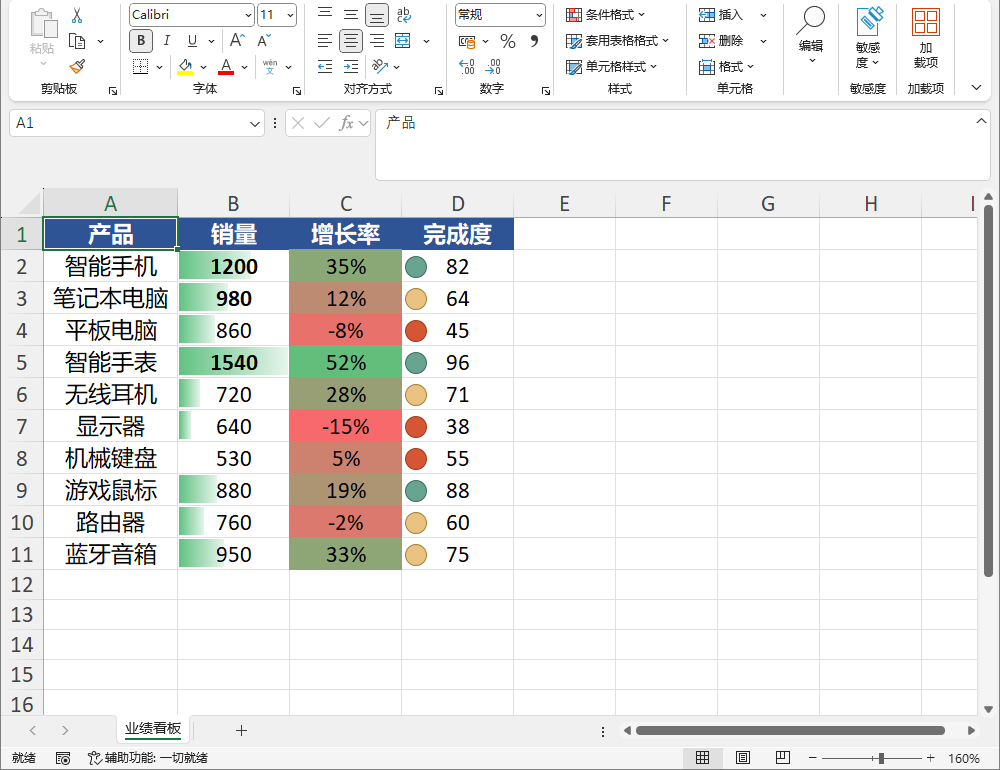
15. 条件格式
本章介绍条件格式的写出与读回:单元格值比较、公式条件、色阶、数据条、长尾类型、图标集。
Warning
- xlsx / xlsm:全部类型读写。
- xlsb:重建写出支持全部 18 种 OOXML 规则类型(cellIs / expression / colorScale / dataBar / iconSet / top10 / aboveAverage / belowAverage / containsText / beginsWith / endsWith / notContainsText / uniqueValues / duplicateValues / containsBlanks / notContainsBlanks / containsErrors / notContainsErrors / timePeriod / textLength),含
Style的 dxf 填充/字体/边框;无类型丢弃。 - xls / csv:不支持条件格式,写出时全部丢弃并上报。
15.1 单元格值比较(cellIs)
ConditionalFormatType.CellIs 按 ConditionalOperator 与固定值比较,命中后套用 Style:
var ws = Excel.Create().Worksheets["Sheet1"];

ws.ConditionalFormats.Add(new ConditionalFormat
{
    Sqref = "B2:B10",
    Type = ConditionalFormatType.CellIs,
    Operator = ConditionalOperator.GreaterThan,
    Formula = "100",
    Style = new CellStyle { Bold = true, FillColor = "#FFC7CE" },
});
ConditionalOperator:LessThan / LessThanOrEqual / Equal / NotEqual / GreaterThan / GreaterThanOrEqual / Between / NotBetween。Between 用 Formula(下限)+ Formula2(上限)。
ConditionalFormat 通用成员:
| 参数 | 类型 | 说明 |
|---|---|---|
Sqref |
string |
应用范围(A1 风格,可含多个区域,如 A1:A100 D2:D9) |
Type |
ConditionalFormatType |
规则类型(见本章各节) |
Operator |
ConditionalOperator |
仅 CellIs 有效(默认 GreaterThan) |
Formula / Formula2 |
string? |
比较目标 / Between 上限 |
Style |
CellStyle? |
命中时的样式(字体 / 填充 / 边框,不含对齐与数字格式) |
15.2 公式条件(expression)
ConditionalFormatType.Expression 用返回 TRUE / FALSE 的公式判定,公式用相对引用(当前单元格起算):
ws.ConditionalFormats.Add(new ConditionalFormat
{
    Sqref = "A1:A100",
    Type = ConditionalFormatType.Expression,
    Formula = "MOD(ROW(),2)=0",     // 偶数行高亮
    Style = new CellStyle { FillColor = "#D9E1F2" },
});
15.3 色阶(colorScale)
ConditionalFormatType.ColorScale 按数值高低在低 / 高色间渐变,MidColor 非空时变为 3 色刻度:
ws.ConditionalFormats.Add(new ConditionalFormat
{
    Sqref = "C2:C10",
    Type = ConditionalFormatType.ColorScale,
    ColorScale = new ColorScaleInfo
    {
        LowColor = "F8696B",
        HighColor = "63BE7B",
        MidColor = "FFEB84",        // 设 nonNull 时启用 3 色刻度
    },
});
| 参数 | 类型 | 说明 |
|---|---|---|
LowColor |
string |
低值颜色(#RRGGBB 或 RRGGBB) |
HighColor |
string |
高值颜色 |
MidColor |
string? |
中间色;非空时为 3 色刻度,否则 2 色 |
15.4 数据条(dataBar)
ConditionalFormatType.DataBar 在单元格内绘制与数值成比例的条形:
ws.ConditionalFormats.Add(new ConditionalFormat
{
    Sqref = "D2:D10",
    Type = ConditionalFormatType.DataBar,
    DataBar = new DataBarInfo
    {
        Color = "638EC6",
        ShowValue = true,
        MinLengthPercent = 0,
        MaxLengthPercent = 100,
    },
});
| 参数 | 类型 | 说明 |
|---|---|---|
Color |
string |
条形颜色(默认 Excel 蓝 638EC6) |
ShowValue |
bool |
是否同时显示数值(默认 true;false 只显示条形) |
MinLengthPercent / MaxLengthPercent |
int |
最短 / 最长条形长度百分比(0-100) |
15.5 长尾类型
以下各类型为条件格式的长尾能力,命中规则与专用属性见注释:
// 包含指定文本
ws.ConditionalFormats.Add(new ConditionalFormat
{
    Sqref = "A2:A100",
    Type = ConditionalFormatType.ContainsText,
    Text = "urgent",
    Style = new CellStyle { Bold = true },
});

// 以指定文本开头 / 结尾 / 不包含
// Type = BeginsWith / EndsWith / NotContainsText,同样用 Text

// 文本长度比较
ws.ConditionalFormats.Add(new ConditionalFormat
{
    Sqref = "B2:B100",
    Type = ConditionalFormatType.TextLength,
    Operator = ConditionalOperator.GreaterThan,
    Formula = "10",
});

// 时间周期
ws.ConditionalFormats.Add(new ConditionalFormat
{
    Sqref = "C2:C100",
    Type = ConditionalFormatType.TimePeriod,
    TimePeriod = "today",   // yesterday/today/tomorrow/lastWeek/thisWeek/nextWeek/lastMonth/thisMonth/nextMonth
});

// 空 / 非空 / 错误 / 非错误
ws.ConditionalFormats.Add(new ConditionalFormat { Sqref = "D2:D100", Type = ConditionalFormatType.Blanks });
ws.ConditionalFormats.Add(new ConditionalFormat { Sqref = "D2:D100", Type = ConditionalFormatType.NoBlanks });
ws.ConditionalFormats.Add(new ConditionalFormat { Sqref = "E2:E100", Type = ConditionalFormatType.Errors });
ws.ConditionalFormats.Add(new ConditionalFormat { Sqref = "E2:E100", Type = ConditionalFormatType.NoErrors });

// 唯一 / 重复值
ws.ConditionalFormats.Add(new ConditionalFormat { Sqref = "F2:F100", Type = ConditionalFormatType.Unique });
ws.ConditionalFormats.Add(new ConditionalFormat { Sqref = "F2:F100", Type = ConditionalFormatType.Duplicate });

// 前 N 项 / 前 N%
ws.ConditionalFormats.Add(new ConditionalFormat
{
    Sqref = "G2:G100",
    Type = ConditionalFormatType.Top10,
    Rank = 10,
    Percent = false,
});

// 高于 / 低于平均
ws.ConditionalFormats.Add(new ConditionalFormat { Sqref = "H2:H100", Type = ConditionalFormatType.AboveAverage });
ws.ConditionalFormats.Add(new ConditionalFormat { Sqref = "H2:H100", Type = ConditionalFormatType.BelowAverage });
15.6 图标集(iconSet)
IconSetInfo 提供 17 个内置集合枚举 + 任意集合名 + 阈值:
ws.ConditionalFormats.Add(new ConditionalFormat
{
    Sqref = "I2:I100",
    Type = ConditionalFormatType.IconSet,
    IconSet = new IconSetInfo
    {
        Style = IconSetStyle.ThreeArrows,       // 默认三色箭头
        Percent = true,
        ShowValue = true,
        // Thresholds 为空时按图标数均分百分比
        // Thresholds = new double[] { 33, 66 },
    },
});
IconSetStyle 枚举(17 种):ThreeArrows / ThreeArrowsGray / ThreeFlags / ThreeTrafficLights / ThreeTrafficLights2 / ThreeSigns / ThreeSymbols / ThreeSymbols2 / FourArrows / FourArrowsGray / FourRedToBlack / FourRating / FourTrafficLights / FiveArrows / FiveArrowsGray / FiveRating / FiveQuarters。也可用 CustomStyleName 指定任意集合名字符串(非空时优先生效)。
| 参数 | 类型 | 说明 |
|---|---|---|
Style |
IconSetStyle |
内置集合(默认 ThreeArrows) |
CustomStyleName |
string? |
任意集合名字符串;非空时优先生效 |
Percent |
bool |
阈值按百分比(true)还是绝对数值(false),默认 true |
ShowValue |
bool |
单元格内是否同显数值,默认 true |
Thresholds |
double[]? |
自定义阈值(图标数 - 1 个,升序);为空则按图标数均分 |
15.7 读回条件格式
打开含条件格式的文件后,Worksheet.ConditionalFormats 自动回填,遍历即可打印每条规则:
var opened = Excel.Open("cf.xlsx");
var cfs = opened.Worksheets[0].ConditionalFormats;
foreach (var cf in cfs)
    Console.WriteLine($"{cf.Type} {cf.Sqref} {cf.Formula}");
输出:
CellIs B2:B10 100
Expression A1:A100 MOD(ROW(),2)=0
ColorScale C2:C10
DataBar D2:D10
IconSet I2:I100
ConditionalFormat 其他成员:Priority(优先级,默认按注册顺序自动编号)、Style(条件满足时样式,不包含对齐与数字格式)。